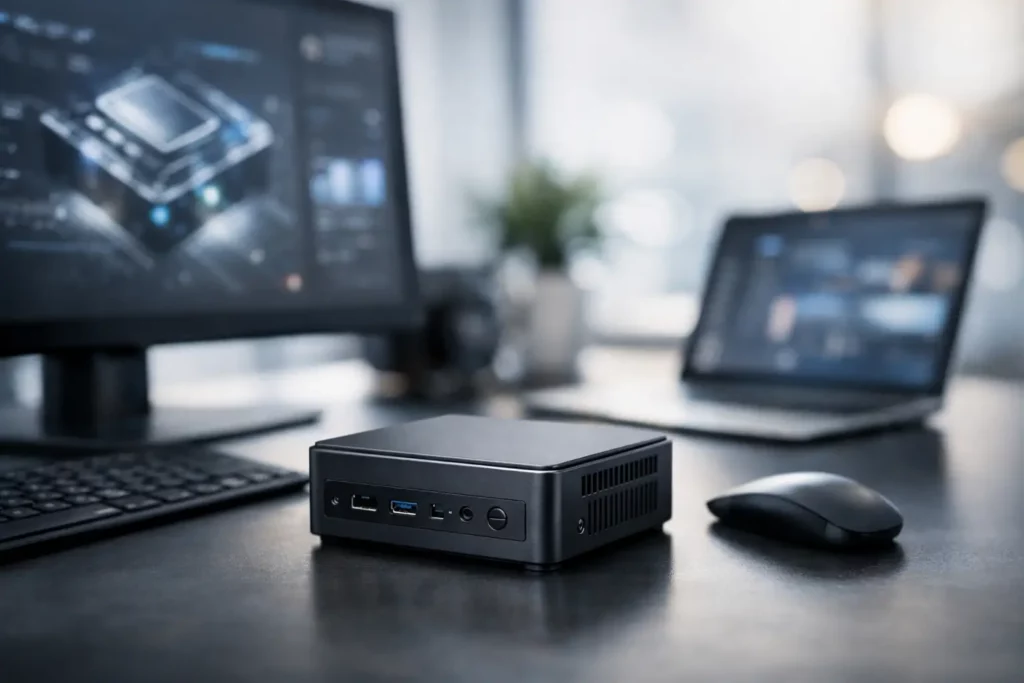
Mini PCs keep showing up with bigger claims and smaller boxes, and that makes every new mini pc launch worth a closer look. On paper, these compact systems promise a lot – desktop-class speed, quiet operation, low power draw, and a setup that barely takes any room on a desk. In practice, the story usually comes down to a few details that manufacturers love to rush past.
That is why mini PC launches tend to generate so much interest across gaming, work-from-home setups, and general tech circles. A tiny machine that can handle everyday productivity, media streaming, light content creation, and maybe even some gaming sounds like a win. But once the announcement hype settles, the real questions are always the same: what chip is inside, how much memory and storage do you actually get, how well does it stay cool, and is the price competitive with a laptop or full-size desktop?
Why a new mini PC launch gets attention so fast
Mini PCs sit in a sweet spot that makes them easy to sell. They are smaller than desktops, often cheaper than premium laptops, and flexible enough to fit in a home office, living room, dorm, or studio apartment. For readers who bounce between work apps, cloud gaming, media playback, and light editing, that mix is appealing right away.
There is also a timing factor. New chip generations from Intel, AMD, and Qualcomm-adjacent Windows hardware pushes have made compact systems feel more relevant than they did a few years ago. Integrated graphics are better, SSDs are faster, and USB4 or Thunderbolt support can stretch what these machines can do. So when a brand announces a new device, people are not just looking at a tiny box. They are looking at a potential replacement for an aging tower, a noisy console-adjacent media system, or an underpowered office PC.
The specs that matter most in a new mini PC launch
The processor is still the headline feature, and for good reason. A modern Ryzen 7 or Core Ultra chip can make a mini PC feel genuinely quick for multitasking, creative apps, and everyday desktop use. If a launch is centered around an older low-power chip dressed up with shiny marketing, that is usually where expectations need to cool off.
Memory matters almost as much. Eight gigabytes can still show up in lower-priced models, but it is starting to feel cramped for buyers who keep a lot of browser tabs open, run chat apps all day, and switch between streaming, spreadsheets, and light editing. Sixteen gigabytes is the safer baseline, while 32GB starts making sense if the machine is pitched toward creators or heavier multitaskers.
Storage is where launch headlines can get misleading. A brand might advertise 1TB, which sounds great, but the real question is whether the included SSD is fast and whether the system has room for expansion. Some mini PCs offer a second M.2 slot or a 2.5-inch bay. Others are much more limited, and that can affect long-term value more than the launch slides suggest.
Then there are ports, which are a huge part of whether a mini PC feels useful or restrictive. Dual monitor output, multiple USB-A ports, USB-C with power delivery or display support, 2.5Gb Ethernet, and a headphone jack still matter in the real world. If a compact machine needs a dongle for everything, the clean desk setup starts looking a lot less clean.
Performance claims versus real use
This is where mini PC announcements often get a little too ambitious. Brands love to show a system editing video, driving three displays, and handling gaming in the same promo cycle. Technically, some of that may be true. But there is a big difference between being able to run a workload and being comfortable doing it every day.
For office tasks, web use, media playback, and school work, most recent midrange mini PCs are more than enough. They boot fast, stay responsive, and take up almost no space. That is the easy part.
Gaming is where buyers need to read between the lines. Integrated graphics have improved a lot, especially on stronger AMD chips, but a mini PC without discrete graphics is still usually a light gaming machine first. Esports titles, indie games, older AAA releases, and cloud gaming make sense here. Newer high-end games at demanding settings usually do not.
Creator workloads are similar. A compact system can absolutely handle photo editing, light video work, music production, and streaming setups. But if the launch is framed like this little box replaces a serious workstation for every user, that is where trade-offs show up fast. Thermal limits, shared graphics memory, and fan noise can all change the experience under sustained load.
Cooling can make or break the experience
This is probably the least exciting part of any announcement and one of the most important. Mini PCs live and die by thermals. Small chassis designs are great for desks and entertainment centers, but they leave less room for airflow and heat dissipation.
A well-designed mini PC can stay quiet and hold stable performance, even with a capable processor inside. A weaker design may benchmark well for a short run and then throttle during longer sessions. That matters if you are exporting a video, compiling code, or gaming for more than twenty minutes.
Noise is another factor that gets overlooked during a launch. Compact fans spinning aggressively in a small enclosure can be much more noticeable than buyers expect. A mini PC that looks perfect for a minimalist setup can become annoying fast if it whines under moderate load. That does not mean every small system runs loud, but it does mean cooling design deserves as much attention as the chip name on the box.
Pricing is where the hype gets tested
A new mini PC launch can sound exciting until the price drops and everyone starts doing math. This category gets tricky because the value proposition changes depending on what is included.
If the system ships fully configured with Windows, 16GB or 32GB of RAM, a decent SSD, modern connectivity, and a current-generation processor, a higher price can be easier to justify. If it launches barebones or with entry-level memory and storage, the starting price may look attractive while the realistic total ends up much higher.
That is also where mini PCs run into competition from laptops and prebuilt desktops. For some buyers, spending a little more on a laptop with a screen and battery makes more sense. For others, a budget desktop tower offers better upgrade paths and cooling. The mini PC wins when space, efficiency, and simplicity are part of the value equation.
Who should actually care about a new mini PC launch?
The sweet spot is broader than it used to be. Students, remote workers, casual gamers, and home users who want a quiet media-and-productivity setup are all good candidates. A mini PC can make a lot of sense in apartments, shared spaces, or desk setups where every inch matters.
They also work well for people building specialized setups. Think living room streaming boxes, emulation stations, digital signage systems, travel-friendly work rigs, or compact office fleets. That flexibility is a big reason the category keeps growing.
At the same time, not every buyer needs one. If upgradability is your top priority, a standard desktop still gives you more room to grow. If you want strong gaming performance in modern AAA titles, many mini PCs still ask you to compromise unless you move into much pricier configurations.
What to watch after the announcement
The launch itself is only the start. The more useful story usually comes after reviewers and early buyers get their hands on the hardware. That is when thermal behavior, fan noise, SSD quality, wireless stability, and real-world graphics performance start to come into focus.
It is also worth watching for regional pricing and availability. Some mini PCs launch with aggressive teaser pricing that does not hold once units hit major retailers. Others look niche at first and then become much more compelling once discounts begin.
For readers tracking hardware news on sites like TechLifestyler, that post-launch window is often where the most practical buying signal appears. Specs tell you what a mini PC might do. Early usage tells you what it is actually like to live with.
The best way to look at any new mini pc launch is simple: get excited about the form factor, but stay picky about the details. A tiny machine can be a smart upgrade, a great secondary system, or a perfect fit for a small space. It just has to earn that spot with more than a flashy announcement.



More Stories
Gaming Showcase Recap Today: Biggest Reveals
OLED vs Mini LED Monitors: Which Wins?
Open Back vs Closed Headphones Explained